
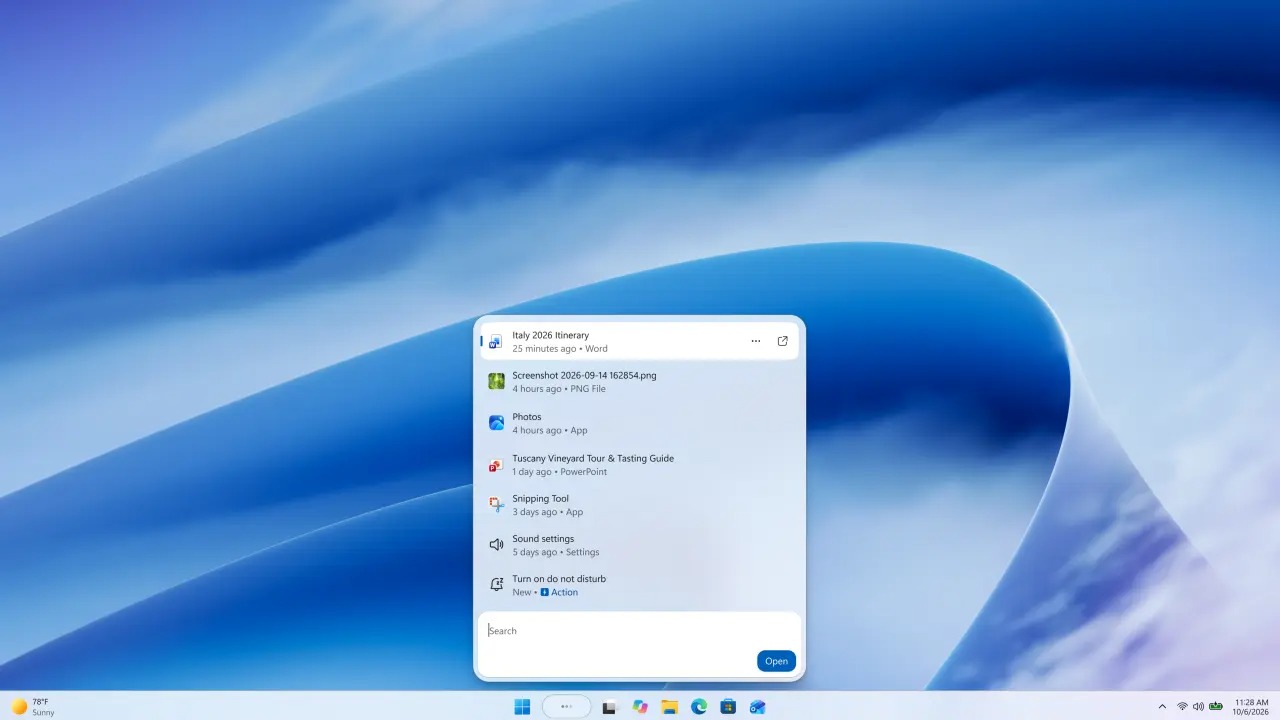
Earlier this year Microsoft presented a plan for improve Windows 11focusing on performanceon thereliability and on theexperience overall of the operating system. After months of remediation, Microsoft now says that “the result is an up to 20% more responsive Windows experience“, with particularly relevant benefits on PCs equipped with 8 GB of RAM.
Microsoft has intervened (and is still intervening) on various components of Windows 11 with the aim of reducing response times and limiting the use of resources by the operating system. The work involves elements such as Start menu, File Explorer, Search, Snipping Tool, Microsoft Edge, and Microsoft 365 applications.
On the official Windows Experience blog, Navjot Virk explained that the claim that the experience is up to 20% more responsive comes from measurement of the response times of some daily operationsincluding opening Search, Start Menu, Settings, Snipping Tool, and File Explorer. The company specifies that the actual results depend on the hardware configuration, use and other factors: the 20% figure therefore does not represent a uniform increase in performance in every situation.
Particular attention was paid to memory management. Microsoft claims to have Optimized the way Windows keeps actively used data in RAMreducing the need to transfer them to a storage drive, which is generally slower than system memory.
According to the company, the system can now keep up to 2 GB more active data in memory than before. The potential benefit mainly concerns computers with 8 GB of RAM, on which opening numerous applications or browser tabs at the same time can put pressure on available resources.
Widgets have also been optimized: on devices with 8 GB of RAM or less they only load when the user opens them. Microsoft estimates that this change could free up over 200 MB of memory for other applications. This is an intervention that reduces consumption in the background, without necessarily requiring a hardware update.
The changes aren’t just about performance. Microsoft is also intervening on the daily experience, with the aim of make Windows 11 less invasive and more adaptable to user preferences.
Among the new features is the possibility of also place the taskbar at the top or sides of the screen. Widgets are also more discreet, while Windows Update gives you more control over your update schedule and reduces unnecessary reboots. The company also claims to have worked to reduce the time needed to install updates.
They were Improved Windows Hello and Bluetooth headset supportwith interventions on the pairing procedure, reconnection and the quality of audio interactions. Microsoft indicates, in particular, a reduction of up to 15 seconds in AirPods pairing times.
Another area affected by the interventions is Windows Searchaccessible from the taskbar. Microsoft is preparing a new interface that aims to transform search from a simple tool for locating files, applications and settings to a access point to perform some operations directly.
Looking for a setting like dark mode or night light, for example, is you can change it directly from the resultswithout having to open the Settings app and navigate through menus. Search may also offer commands to minimize or organize open windows.
Microsoft also plans to extend these features to interactions with the smartphone connected to the PC. The new search experience is currently available to members of the Windows Insider program, with wider rollout expected later this year. No specific date has been given for general availability.
Microsoft it is also expanding integration between Windows 11 and mobile devices. Notifications and messages from Android and iPhone can be viewed from the Start menu, with the ability to open a conversation in a dedicated window and respond without interrupting work on the PC.
With compatible Android smartphones, you can also open mobile applications in resizable windows, access files directly from File Explorer, and quickly view photos you’ve just taken. The Resume function allows you to resume some supported activities from where they left off.
Microsoft Photos is also getting an update. The new experience brings together images on your PC and in connected libraries in a renewed gallery, allows you to search for content by describing it with common words and offers tools for creating albums. The integrated editor includes functions to crop images, adjust colors, remove unwanted objects and adjust lighting through the Relight tool.
https://www.youtube.com/watch?v=62yLzOLBXOw
According to data released by Microsoft, the Photos app launches up to 20% faster compared to the previous version taken as reference. The viewer has also been redesigned to reduce unnecessary elements and leave more space for images. Finally, there are improvements of various kinds, including accessibility features. New features will be rolled out progressively and their availability may vary based on region, configuration, and version of Windows installed.