
Microsoft he presented Project Zenitha new approach to Windows 11 designed specifically for developers and for a generation of PCs with hardware that can handle it locally AI-related workloads. The project represents the evolution of the development-optimized Windows experience anticipated during Build 2026 and aims to provide an operating system already configured to start programming without having to manually intervene on numerous settings.
The characterizing hardware requirement of Project Zenith is the presence of at least 64 GB of unified memory and a bandwidth greater than 250 GB/s. The first platform to support this configuration will be AMD Ryzen AI Halo, while Microsoft expects the arrival of further devices created together with its OEM partners and semiconductor manufacturers in the coming months, also with different hardware solutions.
The choice of memory and related bandwidth is also linked to the growing importance of AI in software development. According to Microsoft, Project Zenith systems will allow run models with over 30 billion parameters locally and without costs related to the consumption of cloud tokens. The goal is to allow developers to experiment more freely with AI models for programming tasks, while reducing reliance on pay-as-you-go cloud services.
Logan Iyer, CVP of Windows Platform and Developer at Microsoft, explained: “Project Zenith devices include a Preset Windows configuration for development and a set of selected tools for what developers use most often. On these devices, developers can run models with over 30 billion parameters locally and without token consumption, accelerating experimentation and helping reduce reliance on pay-as-you-go cloud tokens.”
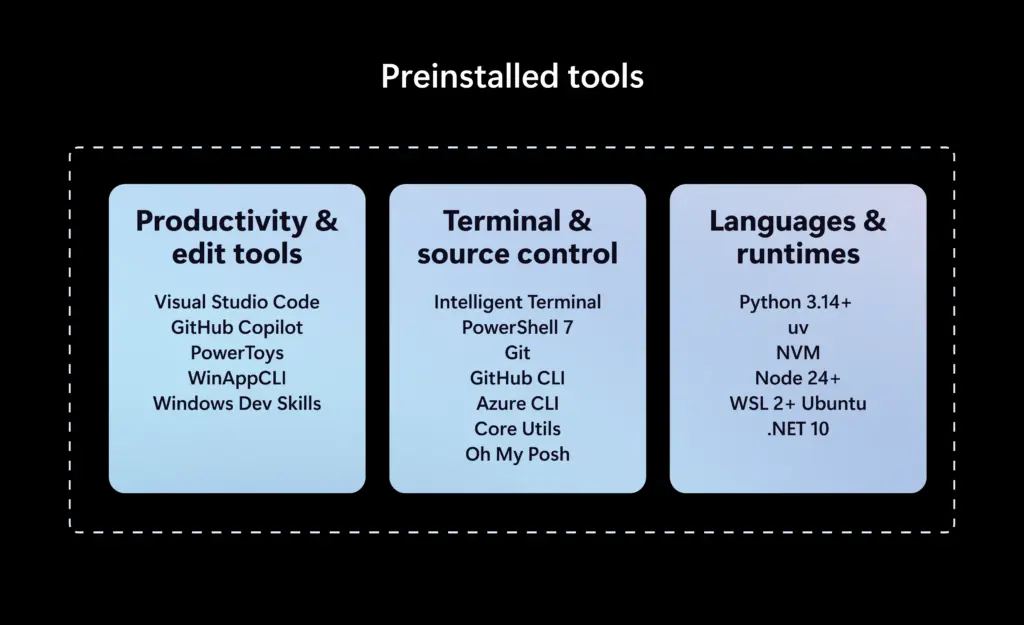
Project Zenith includes a selection of tools already installed, including Visual Studio Code, GitHub Copilot, PowerToys, WinAppCLI, and Windows Dev Skills, plus Windows Terminal. Visual Studio Code and Windows Terminal are also placed directly in the taskbar, making some of the most used tools immediately accessible during development.
Microsoft has also intervened on the default configuration of the interface. File Explorer is set to display file extensions, hidden items, and the full path in the title bar. Support for long routes is also activated. To reduce elements considered a source of distraction, suggestions relating to recently used files and folders and those associated with synchronization providers are disabled.
Search, Start menu and taskbar are also changed. The PowerToys Command Palette is enabled, but Start menu suggestions and account notifications are disabled. The idea is to provide a more essential environment, in which the operating system requires less preliminary intervention before it can be used for development.
Some of these settings, Microsoft notes, are not binding. Project Zenith does not intend to impose a particular working method: developers can continue to customize Windows, install other tools and freely choose languages, frameworks and environments. The project instead aims to modify the starting point, providing a configuration closer to the typical needs of those who program.
An important role is also entrusted to Windows Subsystem for Linux (WSL), which in recent years has become one of the central elements for running Linux workloads within Windows.
“Project Zenith is the result of listening to developers, understanding what they need from Windows today and the direction they want to see for the platform,” Iyer said. “As AI continues to transform software development, we are committed to evolving Windows alongside the community that builds on our platform.”
