

Anthropic has made generally available for Claude Enterprise The smart reports. They are reports that analyze how a team uses Claude and show the work done, how much it costs at list price, where sessions encounter friction and which repeated patterns deserve to become shared skills. With them also come in-app surveys and shared group budgets.
A report is created by Primary Owner, Owner, Admin or anyone with a customized role with viewing access to analytics. A team is chosen, an interval up to the last ones 28 daysone or more products (chat, Claude Code, Claude Cowork or the unified chat and Cowork experience), the areas to focus the analysis on and any personalized questions. Claude then reads a sample of the transcripts in the chosen perimeter, groups them into workstreams and output types, associates the spend with each group and writes the report. Generation usually takes a few hours, more during busy times, and an email arrives when the job is finished. Each organization can run up to 10 reports per month without costs: queued or ongoing reports also count, not failed ones, and the counter starts again on the first day of the following month.
What a report contains
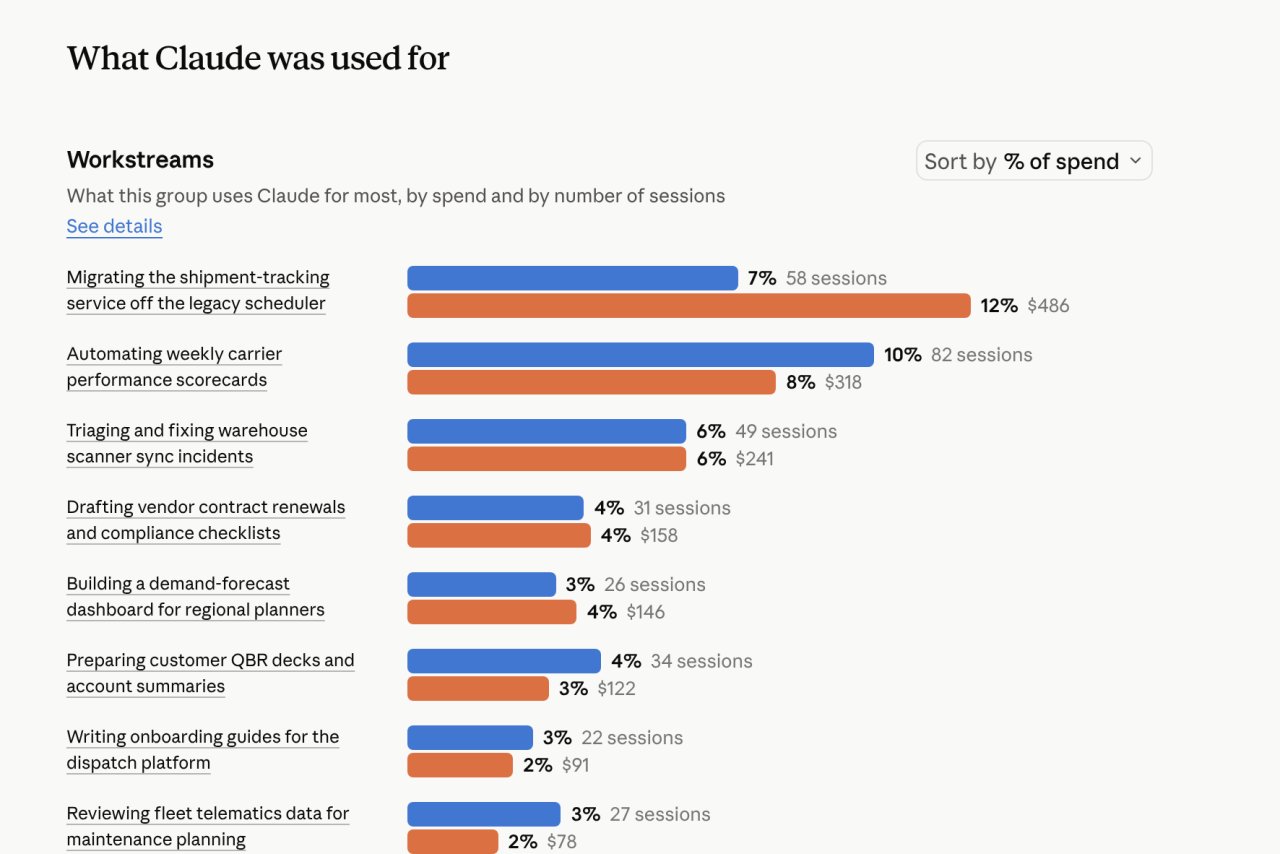
The workstream section shows what the group needs Claude for, by number of sessions and expense. This is followed by the products of the work (analysis, documentation, draft content, code), the average cost per session of each type of output and the outcomes of the sessions.
Among the most common points of friction, the report lists a misconfigured connector, output that does not conform to the request, blocks related to approvals or access, tool errors and repeated remediation cycles. Other sections isolate complex, autonomous work, work that is new to the organization, work that people have automated for themselves, and more expensive sessions. Inefficiencies, i.e. sessions without usable results or those that are personal and off-topic, appear only as an aggregate count and cost. Clicking on a workstream opens the sessions within it, ordered by cost, each with a one-paragraph summary, the product used, the date and the type of output; the report is downloaded in HTML with insights.
The recommendations are brought together in a single list: recurring workflows to be transformed into skills, examples of complex work emerging from the team, rules to add to the code repository. Each result can be shared as an artifact with anyone who can intervene. The report also identifies people held back by their spending limit, and those who have billing permissions and use the assigned view can raise that limit directly from the report. Personalized questions, called custom insights, are answered for each session analyzed (in categories, yes or no, or on a scale) and each answer reports its share of sessions and expenditure. Questions and insights are saved as a template to be reused in subsequent reports.
Attribution, privacy and availability
Attribution to individual users is turned off by default and depends on an organization setting, “Allow attribution to individual users”, which only Owner and Primary Owner can enable. With the setting turned off, each insight shows “User” instead of the name and hides session IDs. Cwith the setting turned on, the names remain hidden until those who consult the report reveal them with a specific check, and each revelation is recorded. Anthropic specifies that the smart reports are used to understand adoption and plan investments in Claude, and that they should not be used to evaluate individual performance or for decisions on the employment relationship.
Two protections for sensitive topics are always active and cannot be deactivated. You cannot ask personalized questions about these topics, either by modifying the templates or writing them from scratch, and the sessions that Claude recognizes as related to them only enter the aggregate analysis, without summary. For personal conversations, neither individual sessions nor names appear. The list includes protected characteristics (ethnicity, religion, gender identity, age, disability, immigration status), health and medical issues, trade union activity, harassment, whistleblowing and confidential legal content at work, political or religious opinions, personal life and feelings towards specific people.
Smart reports are only available on Enterprise plans and start off: an Owner or Primary Owner activates them from Organization settings > Capabilities, in the Analytics section. This leaves out organizations with customer-managed encryption keys (CMEKs), a HIPAA setup, or a hybrid deployment running inference on their own cloud. If your organization uses zero data retention for Claude Code, reports cover chat and Claude Cowork but exclude Claude Code. Owners can delegate access to team leaders without making them admins, limiting it to assigned groups, departments or cost centers. Department and cost center can be brought from the identity provider via SCIM, in case the existing groups do not correspond to the functional teams.
In-app surveys and group budgets
In-app polls add teams’ perspectives on their work with Claude. The default questions are about value: the most useful thing done recently, how Claude changed the timing of that work, what usage a colleague should copy, and what would stop or slow down first if the team lost access. Admins can customize or remove questions and choose recipients, time and location; members see a short tab after a response, in the tool they are already working in. Responses appear on the survey page as they arrive and are exported to a spreadsheet. Surveys can now also be enabled for organizations with CMEK, and where a single retention period is set for all data, surveys and responses are deleted with that deadline.
Shared group budgets give a group a single monthly budget, so those who use Claude a lot are less likely to exhaust their individual limit early while others leave budget unused. The limits of the individuals remain as a protection against anomalous individual consumption: every request weighs on both and the member stops at the first one who runs out. Anyone who reaches a limit can request more from within Claude, and the request goes to the admins for review. The configuration offers an amount calculated on the group’s recent use, and admins with billing permissions receive email alerts at 50%al 75%al 95% et al 100% of the budget.